


Immersive and motion web designs are dynamic UI/UX approaches that use animation, scrolling effects, and interactive transitions to create engaging, cinematic digital experiences. They transform passive browsing into active, memorable storytelling that captivates and delights users.
Immersive & Motion in Action
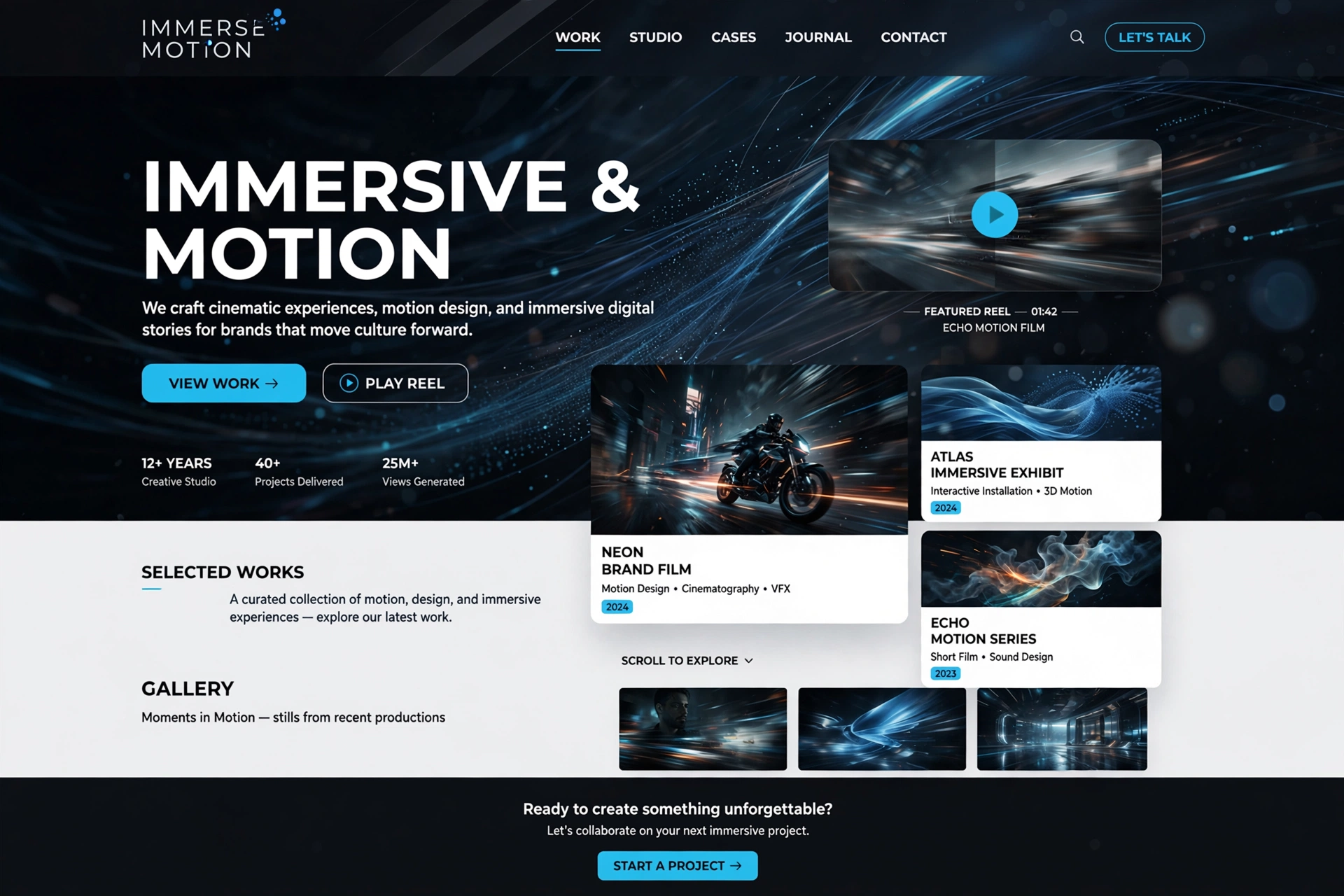
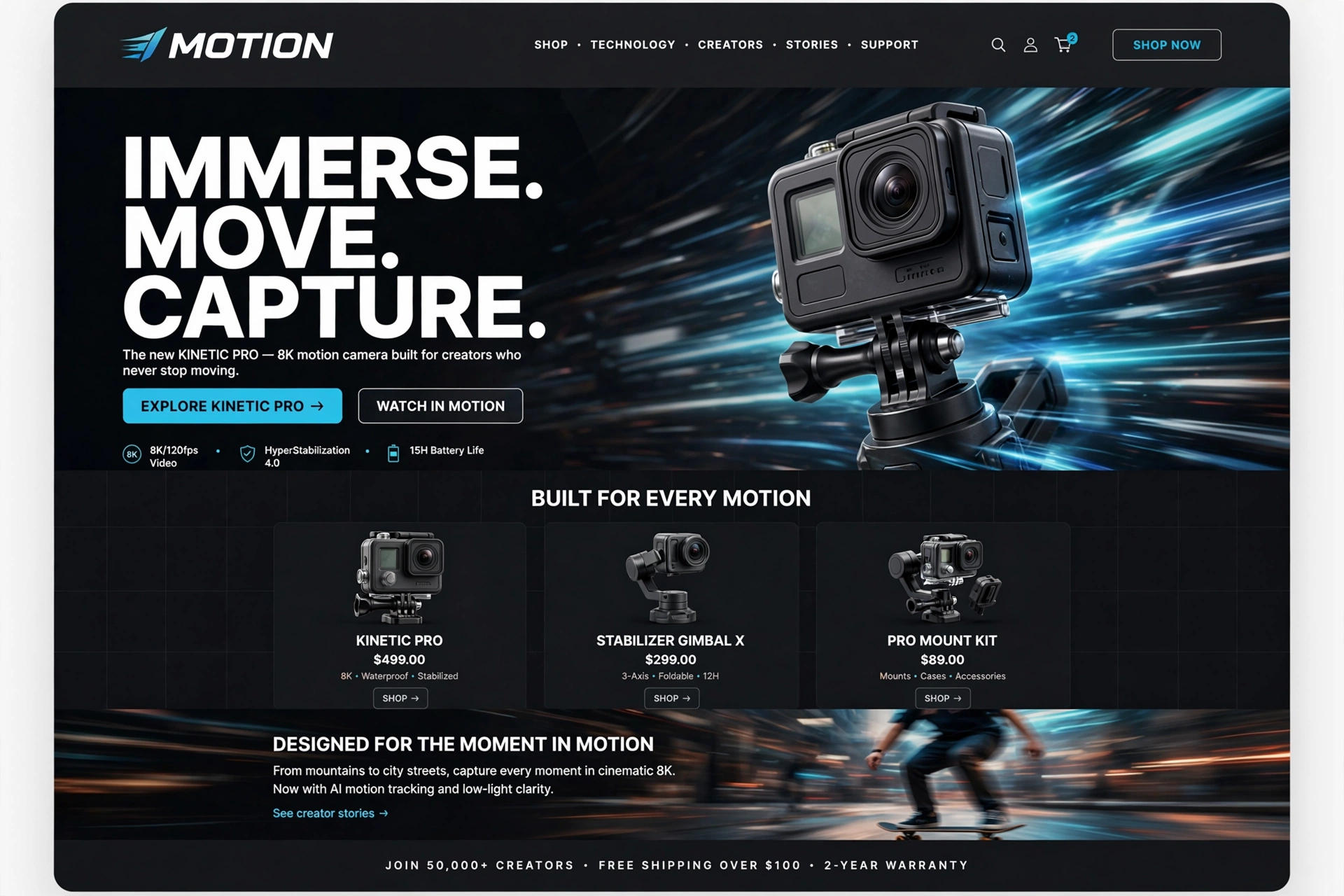
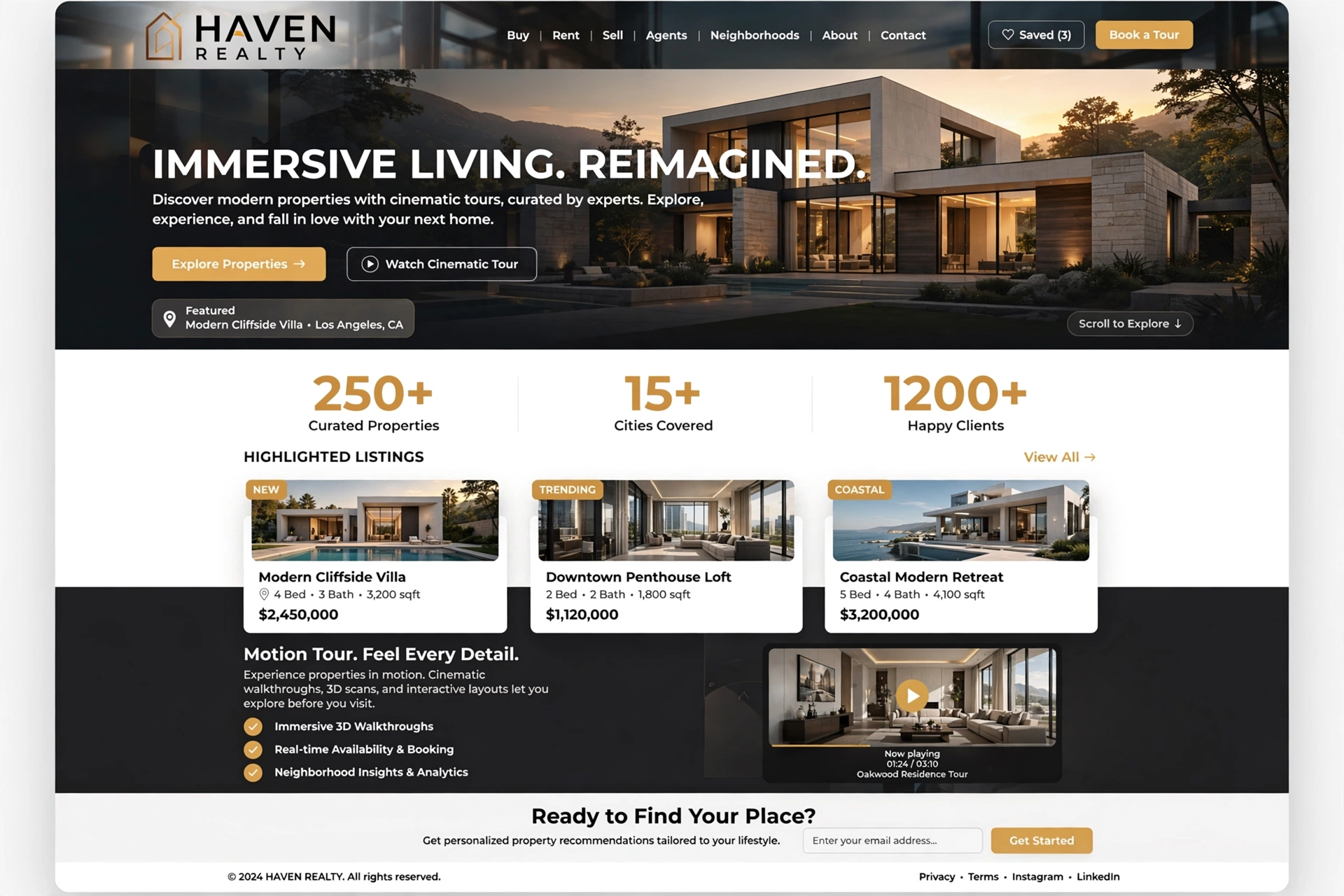
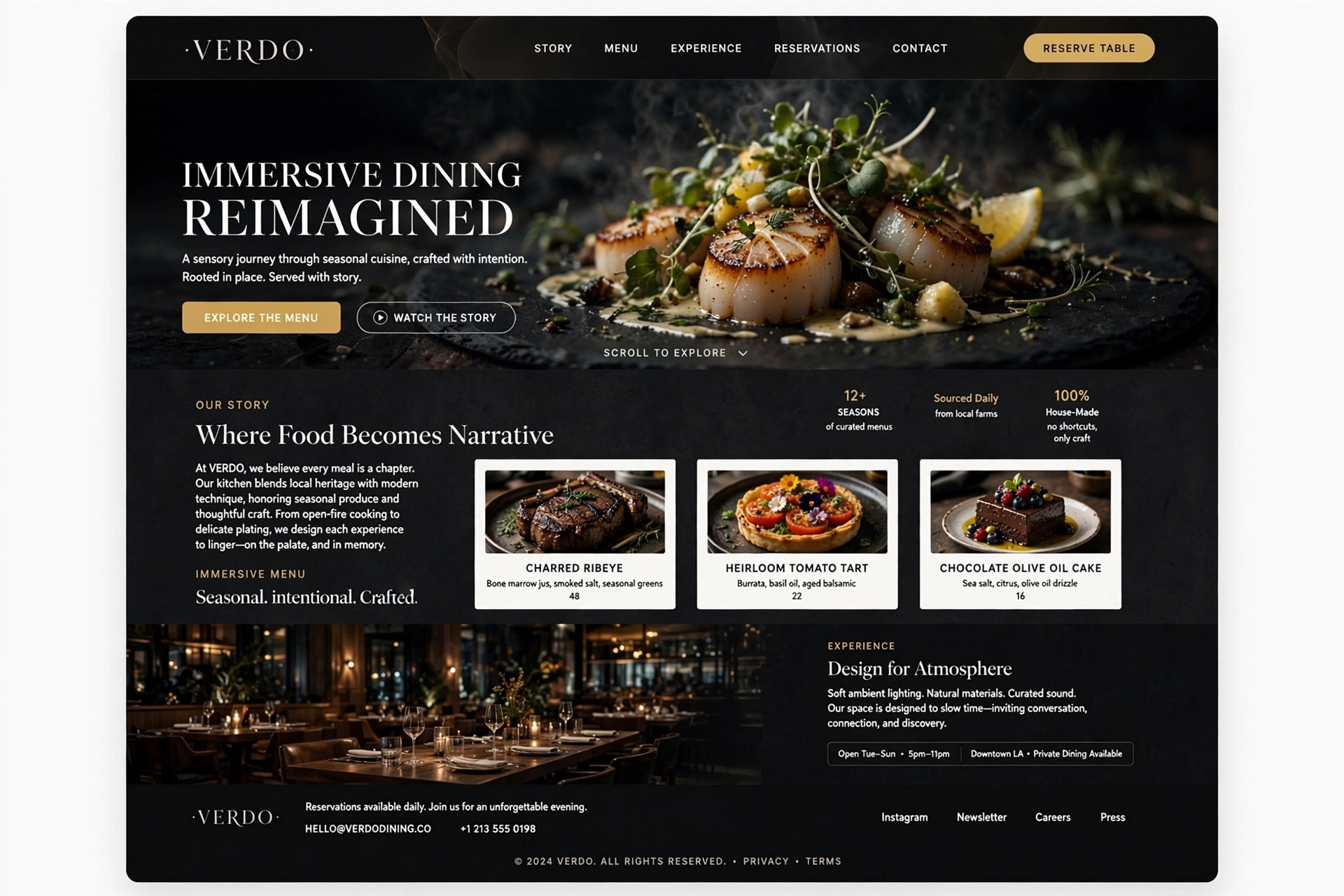
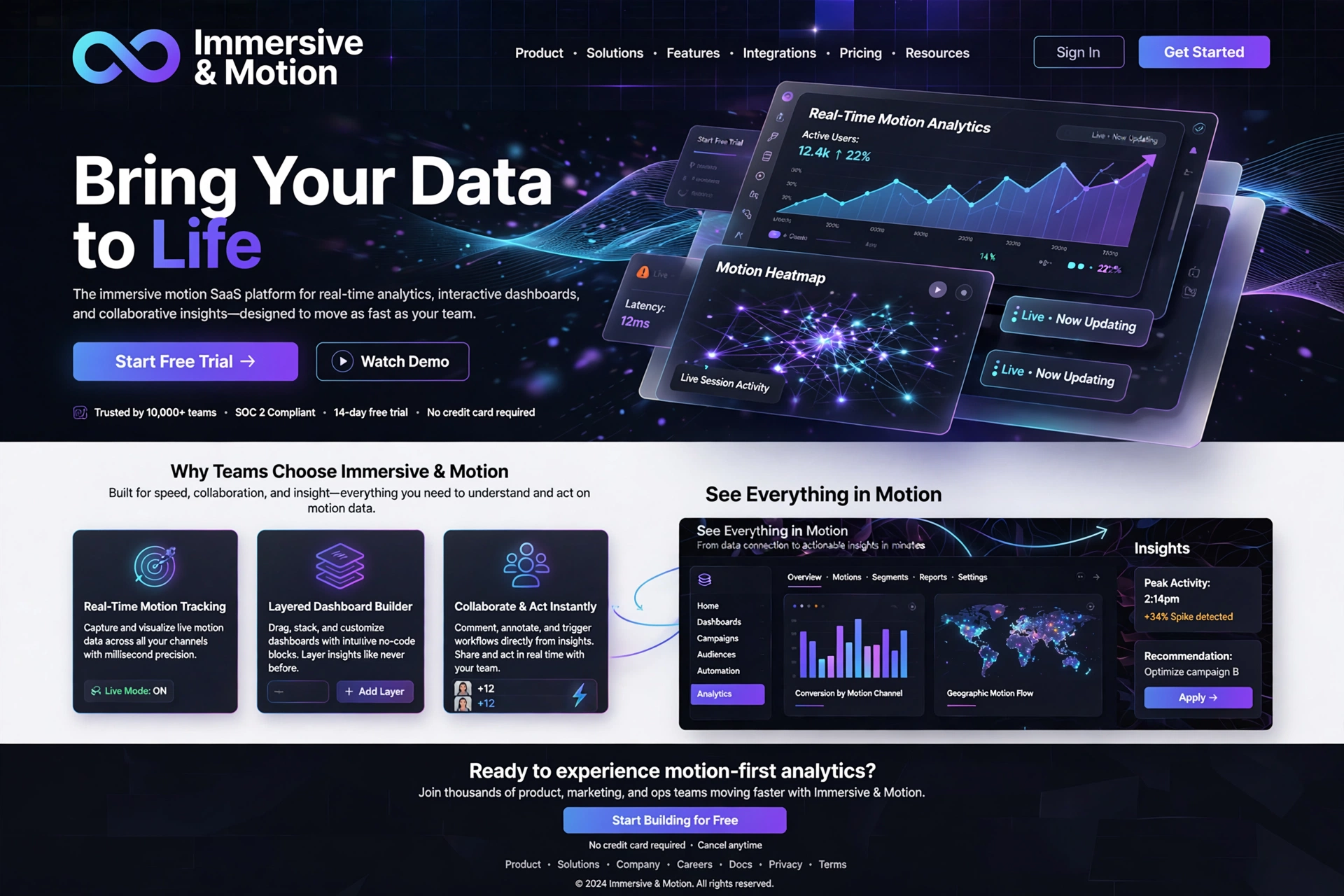
1. Immersive & Motion Design — Overview
Inspired by cinematic storytelling, video games, and interactive art, Immersive & Motion design brings life, emotion, and engagement to digital interfaces. By combining animation, scroll effects, and interactive feedback, these designs transform passive browsing into active, memorable experiences that captivate and delight.
For Everyone:
Immersive & Motion design is like a great film — it draws you in, takes you on a journey, and leaves you with a feeling that stays with you long after the experience ends.
2. Key Elements of Immersive & Motion Design
Immersive and Motion design is defined by several key visual and interactive elements that work together to create a dynamic, engaging, and memorable user experience.
/* Motion & Animation System */
            .animate-on-scroll {
            opacity: 0;
            transform: translateY(40px);
            transition: all 0.8s cubic-bezier(0.16, 1, 0.3, 1);
            }

            .animate-on-scroll.is-visible {
            opacity: 1;
            transform: translateY(0);
            }

            /* Parallax depth layers */
            .parallax-layer {
            will-change: transform;
            transition: transform 0.1s linear;
            }

            .parallax-slow {
            transform: translateY(var(--scroll-offset));
            }

            /* Micro-interaction hover */
            .interactive-card {
            transition: all 0.4s cubic-bezier(0.16, 1, 0.3, 1);
            }
            .interactive-card:hover {
            transform: scale(1.02) translateY(-4px);
            box-shadow: 0 16px 48px rgba(0,0,0,0.12);
            }
Scroll-Triggered Animation
The signature element of immersive design is content that animates as the user scrolls — revealing itself in a narrative sequence that transforms scrolling into a storytelling experience.
Parallax & Depth Layering
Layered content that moves at different speeds creates a sense of depth and immersion. Parallax effects make interfaces feel three-dimensional and cinematic.
Micro-Interactions & Feedback
Subtle, responsive feedback — hover effects, button press animations, and state transitions — makes interfaces feel alive, responsive, and human. Every interaction is acknowledged.
For Everyone:
Motion in design is like the soundtrack of a film — it sets the mood, guides the emotional journey, and makes the story unforgettable.
3. Why Immersive & Motion Design Works
Motion and immersive design taps into how humans naturally process information. Our brains are wired to pay attention to movement — it's a survival instinct. By leveraging this, motion design guides attention, enhances comprehension, and creates emotional engagement.
For Everyone:
Motion design is like a gentle hand guiding you through a story — it directs your attention, creates emotional rhythm, and makes every moment feel intentional and meaningful.
4. Best Used For & Applications
Immersive and Motion design is highly versatile and works well across a range of digital products and industries that value engagement, storytelling, and memorable experiences.
- ◆ Brand Storytelling — Create cinematic, narrative-driven brand experiences.
- ◆ Product Launches — Build anticipation and excitement with animated reveals.
- ◆ Creative Portfolios — Showcase work with dynamic, engaging presentations.
- ◆ Interactive Dashboards — Make data engaging with animated visualizations.
- ◆ Gaming & Entertainment — Create immersive, interactive digital experiences.
For Everyone:
Immersive & Motion design is the director's cut of digital experiences — it uses movement, timing, and emotion to tell a story that resonates and endures.
5. The Philosophy Behind Motion & Immersion
Motion and immersive design is rooted in the philosophy of "active participation" — the belief that the best digital experiences are those that invite interaction, reward exploration, and create emotional resonance. It draws inspiration from cinema, theater, and the natural world.
// Scroll-Triggered Animation with Intersection Observer
            const observer = new IntersectionObserver((entries) => {
            entries.forEach(entry => {
            if (entry.isIntersecting) {
            entry.target.classList.add('is-visible');
            }
            });
            }, {
            threshold: 0.15,
            rootMargin: '0px 0px -10% 0px'
            });

            // Observe all animated elements
            document.querySelectorAll('.animate-on-scroll').forEach(el => {
            observer.observe(el);
            });
For Everyone:
Motion philosophy is like the art of choreography — every movement is purposeful, graceful, and tells a story that words alone cannot convey.
6. Scroll-Triggered Animations
Scroll-triggered animations are the foundation of immersive web design. As users scroll, elements fade in, slide up, transform, or reveal themselves in a carefully choreographed sequence that turns scrolling into a narrative journey.
/* Scroll Animation Variants */
            .reveal-fade {
            opacity: 0;
            transition: opacity 0.8s ease;
            }
            .reveal-fade.is-visible {
            opacity: 1;
            }

            .reveal-slide {
            opacity: 0;
            transform: translateX(-40px);
            transition: all 0.8s cubic-bezier(0.16, 1, 0.3, 1);
            }
            .reveal-slide.is-visible {
            opacity: 1;
            transform: translateX(0);
            }

            .reveal-scale {
            opacity: 0;
            transform: scale(0.9);
            transition: all 0.8s cubic-bezier(0.16, 1, 0.3, 1);
            }
            .reveal-scale.is-visible {
            opacity: 1;
            transform: scale(1);
            }

            /* Staggered children */
            .stagger-children > * {
            opacity: 0;
            transform: translateY(30px);
            transition: all 0.6s cubic-bezier(0.16, 1, 0.3, 1);
            }
            .stagger-children.is-visible > *:nth-child(1) {
            transition-delay: 0.05s;
            }
            .stagger-children.is-visible > *:nth-child(2) {
            transition-delay: 0.15s;
            }
            .stagger-children.is-visible > * {
            opacity: 1;
            transform: translateY(0);
            }
For Everyone:
Scroll-triggered animation is like turning the pages of a beautifully illustrated book — each page reveals something new at just the right moment, keeping you engaged and eager to see what comes next.
7. Parallax & Depth Layering
Parallax scrolling creates the illusion of depth by moving background, midground, and foreground elements at different speeds. This layered effect makes interfaces feel three-dimensional, immersive, and cinematic.
/* Parallax Depth System */
            .parallax-container {
            perspective: 1px;
            height: 100vh;
            overflow-x: hidden;
            overflow-y: auto;
            }

            .parallax-layer {
            position: absolute;
            top: 0;
            left: 0;
            right: 0;
            bottom: 0;
            transform: translateZ(-1px) scale(2);
            }

            /* Different depth layers */
            .depth-background {
            transform: translateZ(-2px) scale(3);
            }
            .depth-midground {
            transform: translateZ(-0.5px) scale(1.5);
            }
            .depth-foreground {
            transform: translateZ(0) scale(1);
            }

            /* Mouse-driven parallax (tilt effect) */
            .tilt-container {
            transition: transform 0.1s ease-out;
            transform-style: preserve-3d;
            }
For Everyone:
Parallax is like looking out the window of a moving train — the foreground rushes by, the midground glides, and the horizon stays still, creating a rich, layered sense of depth.
8. Micro-Interactions & Feedback
Micro-interactions are the small, subtle animations and feedback that acknowledge user actions — a button press, a hover effect, a toggle switch. They make interfaces feel responsive, alive, and human.
/* Micro-Interaction Library */

            /* Button press ripple */
            .btn-ripple {
            position: relative;
            overflow: hidden;
            transition: all 0.3s ease;
            }
            .btn-ripple:active {
            transform: scale(0.96);
            }

            /* Hover lift */
            .hover-lift {
            transition: all 0.4s cubic-bezier(0.16, 1, 0.3, 1);
            }
            .hover-lift:hover {
            transform: translateY(-4px) scale(1.01);
            box-shadow: 0 16px 48px rgba(0,0,0,0.08);
            }

            /* Toggle switch */
            .toggle {
            width: 48px;
            height: 28px;
            border-radius: 14px;
            background: #ddd;
            transition: background 0.3s ease;
            }
            .toggle.is-active {
            background: #667eea;
            }

            /* Loading spinner pulse */
            .spinner {
            animation: spin 1s linear infinite;
            }
            @keyframes spin {
            from { transform: rotate(0deg); }
            to { transform: rotate(360deg); }
            }
For Everyone:
Micro-interactions are like the subtle gestures of a good conversation — a nod, a smile, a gentle touch — they make you feel heard, acknowledged, and connected.
9. Seamless Page Transitions
Seamless page transitions create a cinematic flow between pages, eliminating the jarring "flash of blank" that breaks immersion. Using view transitions, shared element animations, and smooth loading, users feel like they're navigating a single, continuous experience.
/* Page Transition System */

            /* View Transition API */
            ::view-transition-old(root) {
            animation: fade-out 0.4s ease-in-out;
            }
            ::view-transition-new(root) {
            animation: fade-in 0.5s ease-in-out 0.1s;
            }

            @keyframes fade-out {
            from { opacity: 1; }
            to { opacity: 0; }
            }
            @keyframes fade-in {
            from { opacity: 0; transform: scale(0.98); }
            to { opacity: 1; transform: scale(1); }
            }

            /* Shared element transition */
            .shared-element {
            view-transition-name: shared-element;
            }
For Everyone:
Seamless transitions are like the smooth flow of a well-edited film — you're never jerked out of the story, and every scene flows naturally into the next.
10. Storytelling Through Motion
Motion is a powerful storytelling tool. Through timing, pacing, and choreography, motion design can guide emotions, highlight key moments, and create narrative arcs that make content memorable and impactful.
For Everyone:
Storytelling through motion is like a masterful piece of choreography — every movement is purposeful, expressive, and tells a story that words alone cannot capture.
11. Immersive vs. Motion — Core Differences
While often used together, Immersive and Motion have distinct meanings in design. Understanding the difference helps choose the right approach for your project.
| Feature | Immersive Design | Motion Design |
|---|---|---|
| Focus | Overall experience — presence, engagement, narrative | Animation and movement — transitions, effects, feedback |
| Tone | Cinematic, narrative, sensory | Dynamic, responsive, expressive |
| Application | Holistic experience design — storytelling, brand immersion | Specific animation techniques — scroll, hover, transitions |
In practice, Immersive is the overall experience — the feeling of being drawn into a world. Motion is the tool used to create that feeling — the movement and animation that brings the experience to life.
For Everyone:
Immersive is the journey — the feeling of being transported. Motion is the vehicle — the movement that takes you there. Together, they create unforgettable experiences.
12. Implementation Best Practices
To implement an Immersive and Motion design successfully, follow these best practices:
- ◆ Start with scroll-triggered animations: Use Intersection Observer or scroll libraries to trigger reveals as users scroll.
- ◆ Add parallax depth layers: Create a sense of depth by moving background and foreground elements at different speeds.
- ◆ Design purposeful micro-interactions: Add subtle feedback for hover, click, and focus states to make the interface feel alive.
- ◆ Create smooth page transitions: Use view transitions and page load animations for a seamless, cinematic experience.
- ◆ Optimize for performance: Use will-change, GPU-accelerated properties, and lazy loading to maintain smooth 60fps experiences.
- ◆ Respect user preferences: Honor reduced-motion settings for accessibility — not everyone wants motion.
// Immersive Motion Setup

            // 1. Scroll Observer
            const scrollObserver = new IntersectionObserver((entries) => {
            entries.forEach(entry => {
            if (entry.isIntersecting) {
            entry.target.classList.add('is-visible');
            }
            });
            }, { threshold: 0.15 });

            // 2. Parallax handler
            document.addEventListener('scroll', () => {
            const offset = window.scrollY;
            document.querySelectorAll('.parallax-layer').forEach(el => {
            const speed = parseFloat(el.dataset.speed || '0.5');
            el.style.transform = `translateY(${offset * speed}px)`;
            });
            });

            // 3. Reduced motion support
            const prefersReducedMotion = window.matchMedia('(prefers-reduced-motion: reduce)');
            if (prefersReducedMotion.matches) {
            document.body.classList.add('reduce-motion');
            }
For Everyone:
Implementation is about bringing stories to life — using motion to guide, delight, and immerse, while always respecting the user's need for control and accessibility.
13. Inspirations & Examples of Immersive & Motion Design
The best way to master a design style is to study how it's being used in the wild. Here are some real-world inspirations and notable examples of Immersive and Motion design across different industries.
Apple Vision Pro — Immersive UX
Apple Vision Pro's interface is a masterclass in immersive motion — with spatial animations, parallax depth, and cinematic transitions that create an unprecedented sense of presence.
Visit Vision ProAwwwards — Motion Showcase
Awwwards features the best immersive and motion-driven websites on the internet — a curated gallery of cinematic, interactive, and unforgettable digital experiences.
Visit AwwwardsStripe Press — Editorial Motion
Stripe Press uses subtle scroll animations, elegant transitions, and immersive typography to create a print-like reading experience that feels both modern and timeless.
Visit Stripe PressBruno Simon — Immersive Portfolio
Bruno Simon's portfolio is a legendary example of immersive 3D motion — featuring a fully interactive 3D environment that blurs the line between web and game.
Visit Bruno SimonThe FWA — Motion Innovation
The FWA (Favorite Website Awards) is a curated showcase of the most innovative motion and immersive design — pushing the boundaries of what's possible on the web.
Visit The FWAApple — Product Page Motion
Apple's product pages are benchmarks of immersive motion — with scroll-triggered reveals, parallax depth, and cinematic transitions that make products feel magical and alive.
Visit AppleFor Everyone:
Inspiration is everywhere — from the opening credits of a film to the scrolling of a beautifully designed website. The key is to observe the motion — the timing, the pacing, the emotion — and bring that cinematic quality to your digital work.
14. Future Trends & Evolution of Immersive & Motion Design
As digital design continues to evolve, Immersive and Motion approaches are adapting to new technologies and user expectations. Here's what the future holds for these design paradigms.
AI-Powered Motion Generation
AI tools will automatically generate motion sequences — suggesting optimal timing, easing, and choreography based on content type and user behavior.
WebGPU & Real-Time 3D Motion
The WebGPU API will enable highly complex, real-time 3D motion in the browser — bringing game-quality animation and immersion to everyday websites.
Spatial & AR Motion Experiences
As augmented reality becomes more prevalent, motion design will extend into 3D space — with animations that respond to the user's physical movements and environment.
Emotion-Aware Motion
Future motion design will adapt to user emotion — using AI to detect mood and adjust animation pacing, intensity, and tone accordingly.
Accessible Motion First
The future of motion design will be accessible by default — with reduced motion alternatives built in at every level, ensuring that immersive experiences are available to everyone.
For Everyone:
The future is motion. As digital experiences become more immersive, the ability to use motion thoughtfully, purposefully, and inclusively will be the defining skill for designers and developers alike.
Got questions?
Frequently Asked Questions
Everything you need to know about Immersive & Motion design — from core concepts to implementation.
Immersive & Motion web design is a dynamic approach that uses animation, scrolling effects, and interactive transitions to create engaging, cinematic digital experiences. It transforms passive browsing into active, memorable storytelling by combining scroll-triggered reveals, parallax depth, micro-interactions, and smooth page transitions.
Inspired by cinema, video games, and interactive art, it brings life, emotion, and engagement to digital interfaces — making every interaction feel intentional and every moment feel cinematic.
The key elements include scroll-triggered animations — content that animates as users scroll, transforming scrolling into a narrative journey. Parallax and depth layering — layered content that moves at different speeds to create a sense of depth and immersion.
Micro-interactions and feedback — subtle, responsive feedback for hover, click, and focus states that make the interface feel alive. And seamless page transitions — smooth animations between pages that create a cinematic, continuous experience. Together, these elements create a sense of engagement and storytelling that static designs cannot match.
Unlike Corporate & Professional design which prioritises structure and trust, Immersive & Motion design prioritises engagement, emotion, and storytelling. Unlike Creative & Bold which focuses on visual impact through typography and colour, Immersive & Motion focuses on movement and timing to create experiences.
It's the most cinematic and interactive of all design styles — turning browsing into an experience rather than just consumption. It's about creating a journey, not just a destination.
Immersive & Motion design is ideal for brand storytelling and cinematic brand experiences that need to captivate audiences. Product launches benefit from animated reveals that build anticipation. Creative portfolios showcase work with dynamic, engaging presentations.
Interactive dashboards make data engaging with animated visualizations. Gaming and entertainment platforms create immersive, interactive digital experiences. It's perfect for any project where engagement, emotion, and memorability are key priorities — where you want to create a journey, not just a page.
Several tools excel at motion design. GSAP (GreenSock Animation Platform) is the industry standard for high-performance animations with advanced control and timeline management. Framer Motion is excellent for React-based projects with declarative animations and gesture support.
Intersection Observer is the native browser API for scroll-triggered animations without external libraries. The View Transition API enables seamless page transitions. For 3D motion, Three.js and WebGL are essential. And for prototyping, Figma's smart animate and Protopie are powerful options. The right tool depends on your project requirements and technical expertise.
Making motion design accessible requires several considerations. Use the prefers-reduced-motion media query to disable or simplify animations for users who need it. Ensure animations are not essential for understanding content — provide alternative ways to access information.
Avoid animation that triggers vestibular disorders — no sudden, unexpected, or large movements. Provide controls for users to pause or stop animations. Use semantic HTML and ensure focus states are clear. And test with screen readers and keyboard navigation. Motion should enhance accessibility, not hinder it — inclusive design is the ultimate sophistication.
Best practices include starting with scroll-triggered animations — use Intersection Observer to trigger reveals as users scroll. Add parallax depth layers — move elements at different speeds for depth. Design purposeful micro-interactions — subtle feedback for user actions.
Create smooth page transitions — use view transitions and load animations. Optimize for performance — use will-change, GPU-accelerated properties, and lazy loading to maintain smooth 60fps experiences. Respect user preferences — honor reduced-motion settings. And tell a story through motion — use timing and pacing to create narrative arcs that guide users through the experience.
Excellent sources of inspiration include Apple Vision Pro — a masterclass in immersive motion with spatial animations and cinematic transitions. Awwwards features the best immersive and motion-driven websites on the internet — a curated gallery of cinematic, interactive digital experiences.
Stripe Press uses subtle scroll animations and elegant transitions. Bruno Simon's portfolio is a legendary example of immersive 3D motion. The FWA (Favorite Website Awards) is a curated showcase of the most innovative motion and immersive design. And Apple's product pages are benchmarks of immersive motion with scroll-triggered reveals and parallax depth. Inspiration is everywhere — from film to the web.
Still have questions? Let's talk
Ready to bring motion to life?
Let's apply these Immersive and Motion design principles to your next project and create a cinematic, engaging, and unforgettable digital experience that captivates your audience and tells your story through motion.
Start your project