

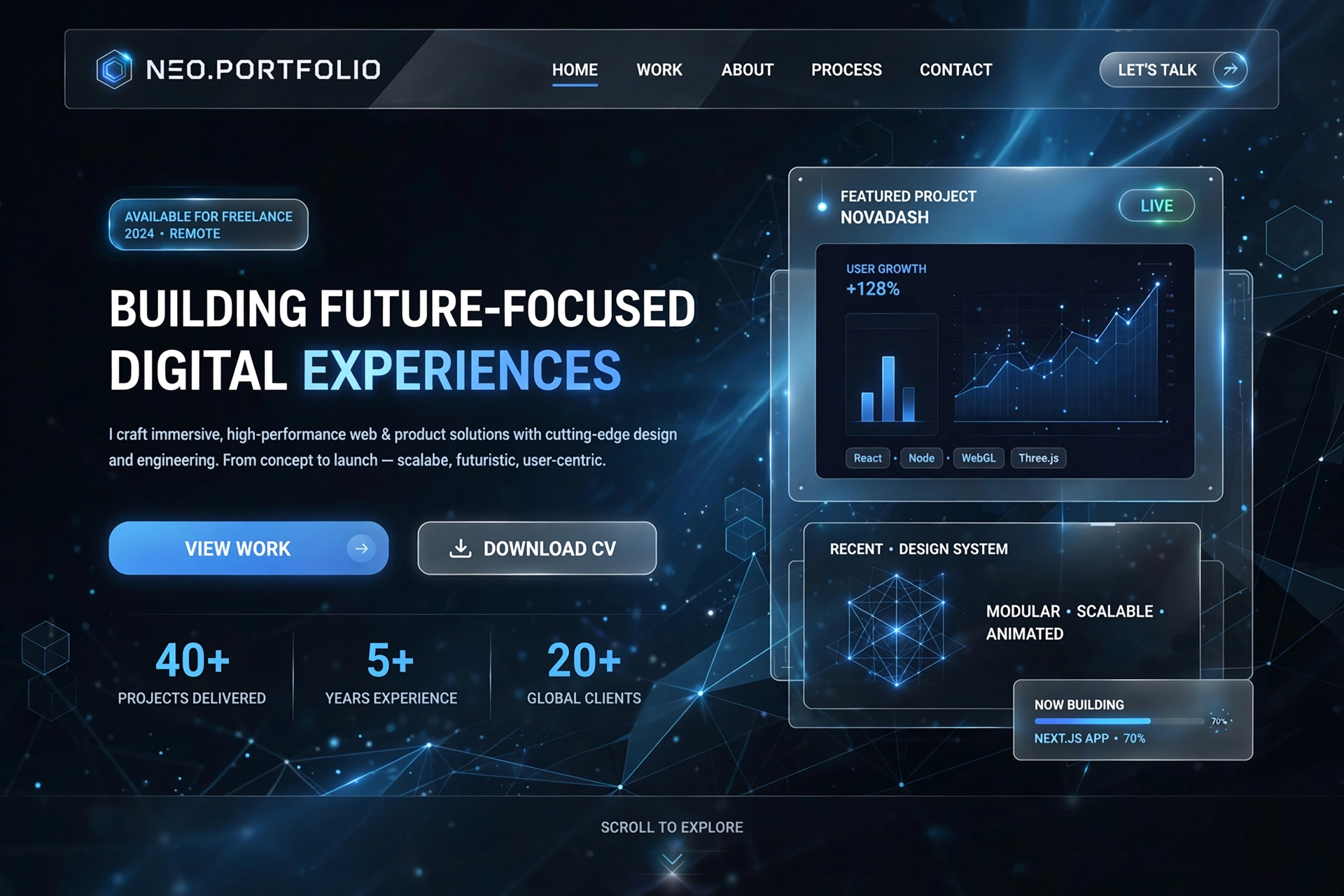
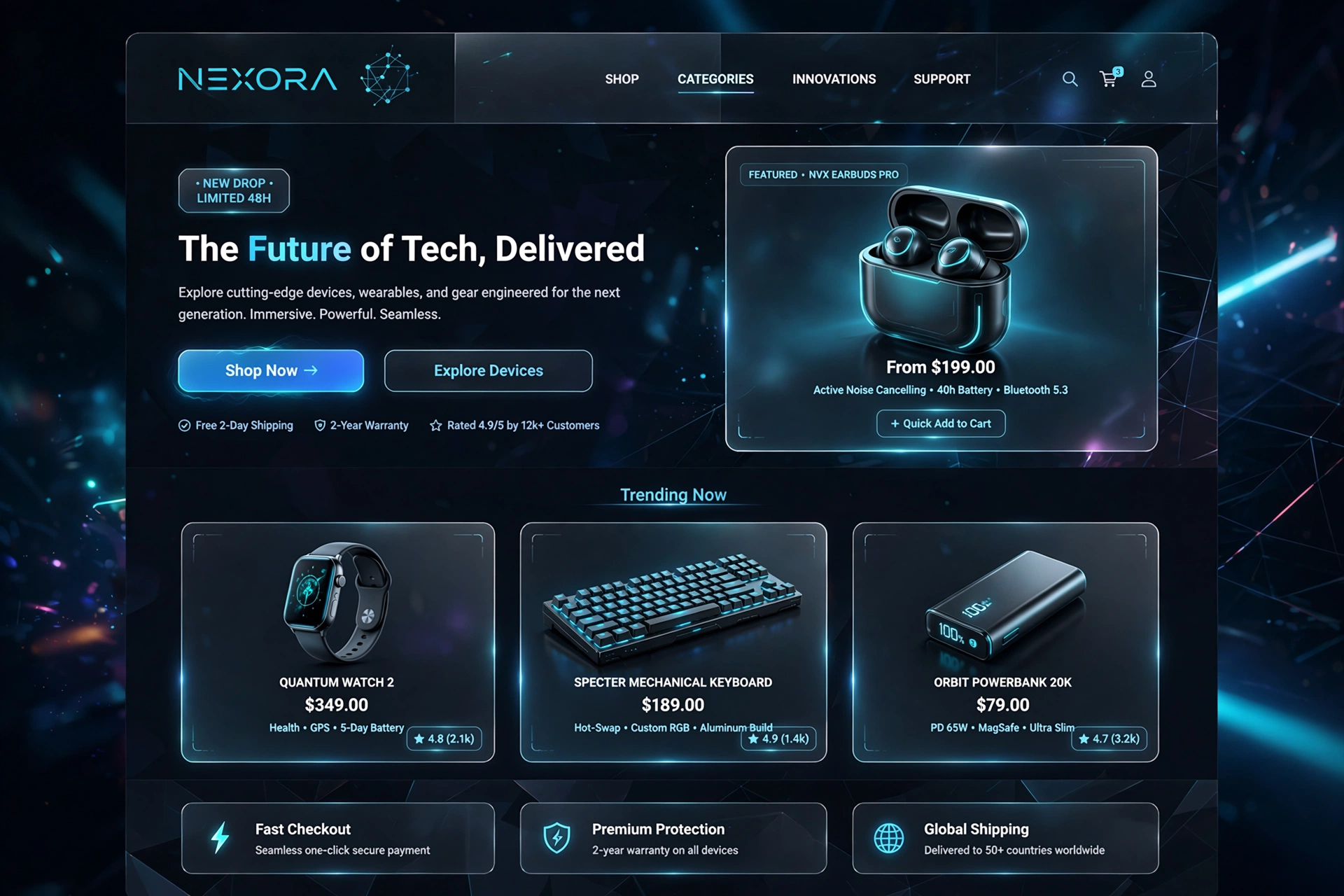
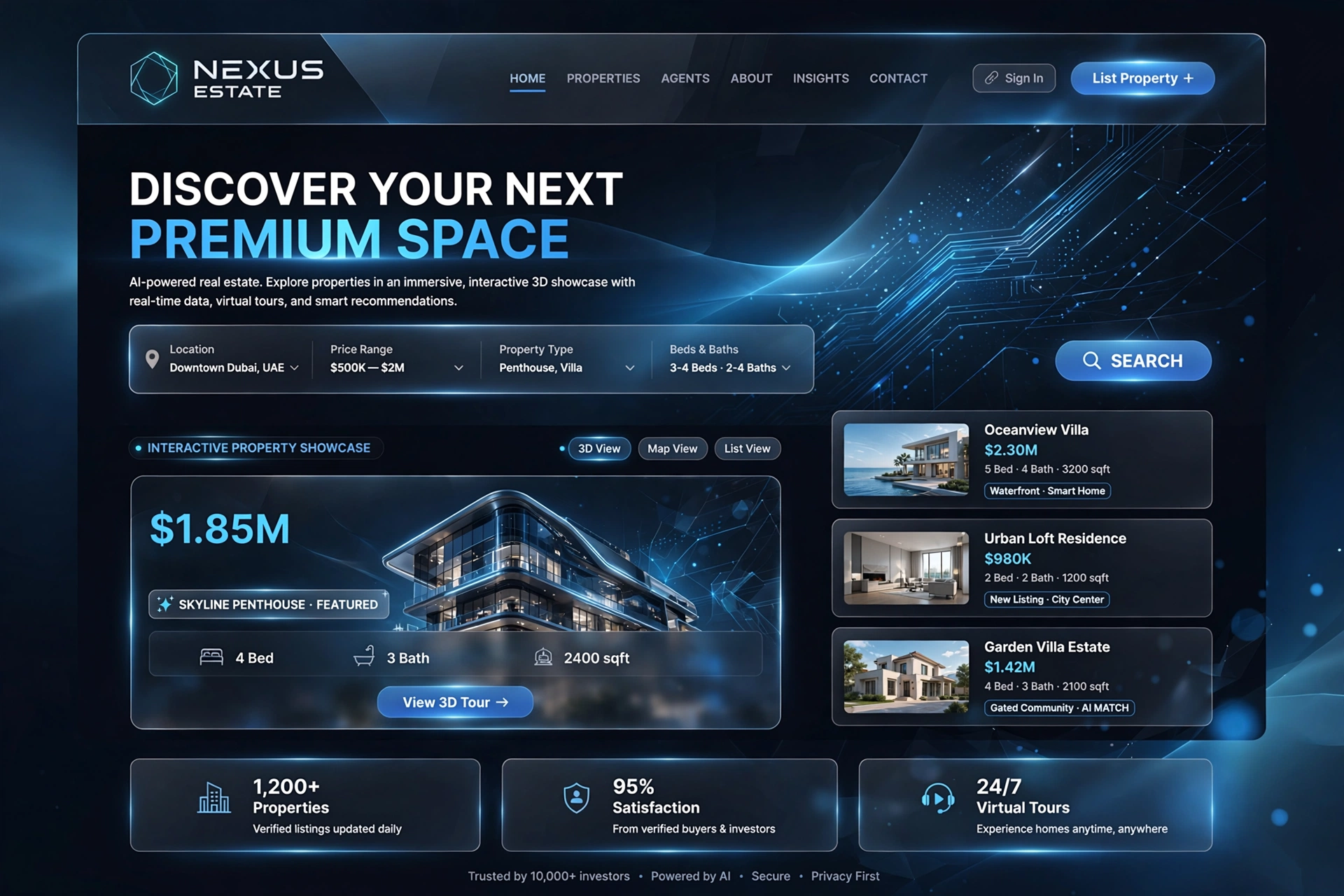
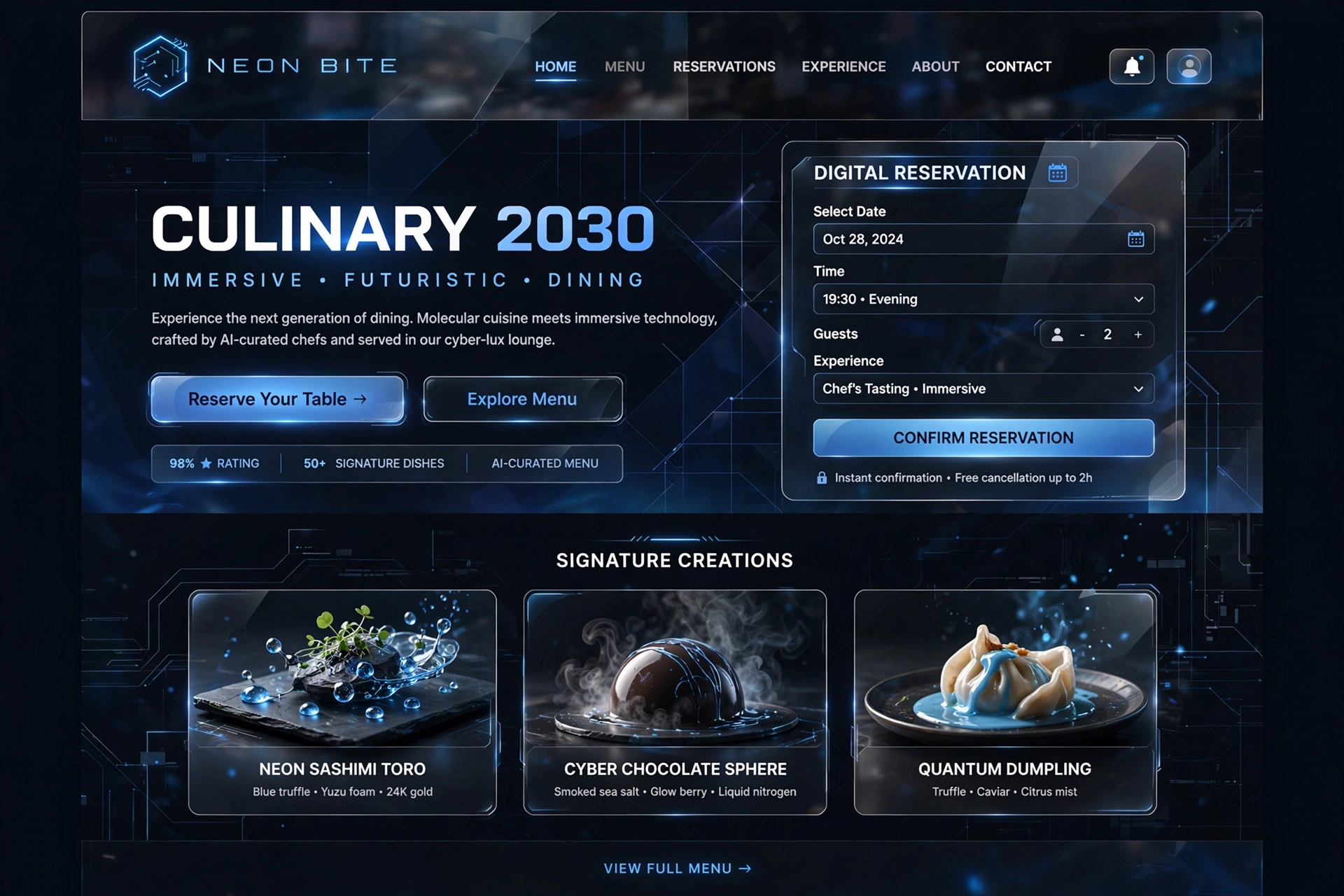
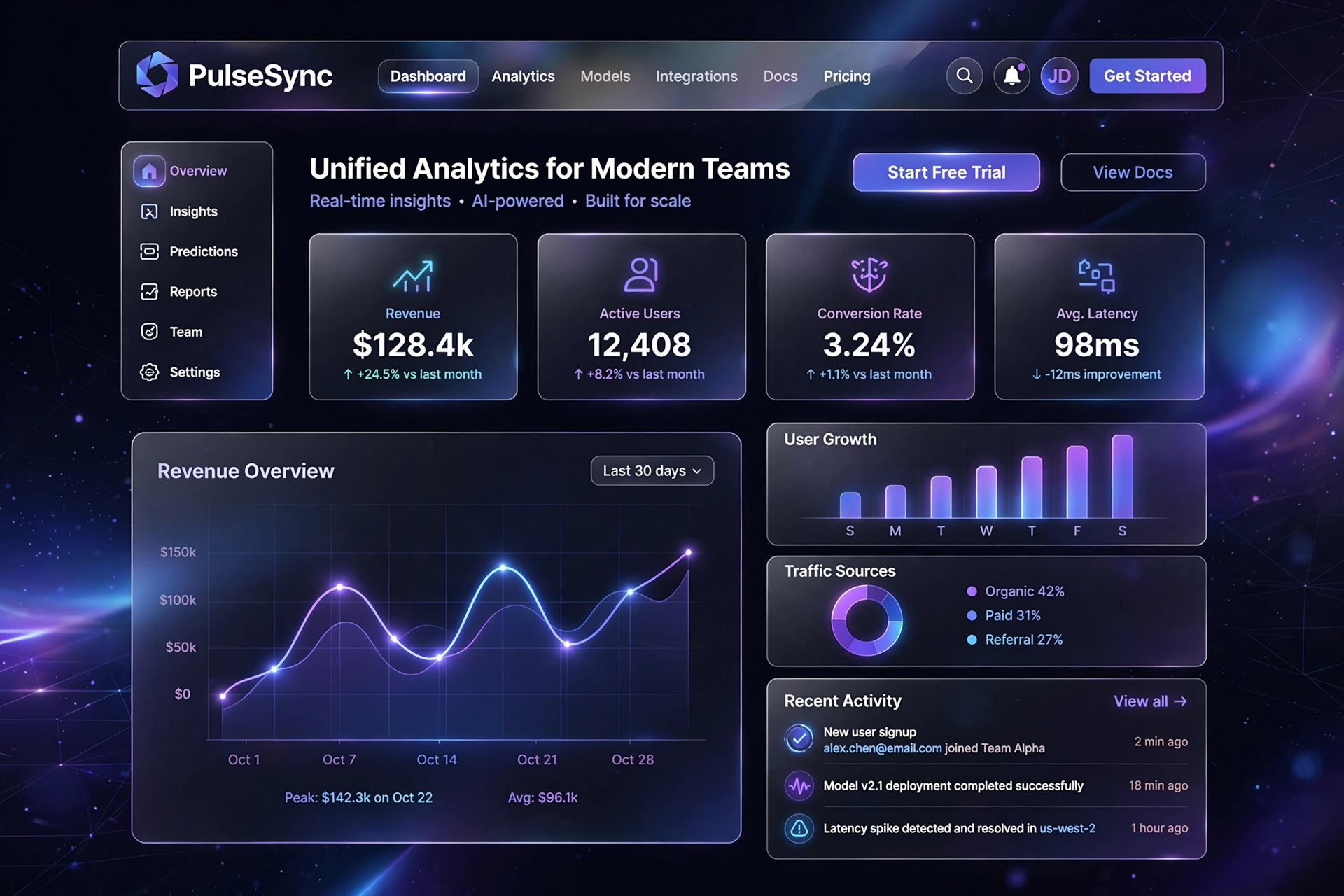
Tech and futuristic web design creates highly immersive, digital-first experiences by using dark backgrounds, neon or metallic color palettes, and 3D visual elements. These designs often feature holographic overlays, interactive components, and dynamic typography to evoke a high-tech, science-fiction aesthetic that captivates users.
Tech & Futuristic in Action
1. Core Characteristics
Tech and futuristic design is defined by a set of distinct visual and interactive characteristics that work together to create an immersive, digital-first experience.
- ◆ Dark Mode & High Contrast — Deep blacks with vibrant neon accents.
- ◆ Immersive 3D Elements — Scroll-triggered 3D models and geometric shapes.
- ◆ Holographic & Glassmorphism Effects — Translucent layers and soft blurs.
- ◆ Kinetic Typography — Bold, monospaced fonts with motion and glitch effects.
- ◆ Micro-Interactions — Custom hover, keyboard, and click effects.
For Everyone:
Tech and futuristic design is like the interface of a sci-fi starship — it's sleek, functional, and immersive, making you feel like you're interacting with technology from the future.
2. Dark Mode & High Contrast
Deep blacks, dark purples, or navy blues are paired with vibrant neon accents (like electric blue, bright cyan, or laser green) to simulate a digital screen or holographic interface. Dark mode reduces eye strain and creates a premium, cinematic feel.
/* Futuristic Dark Mode System */
            :root {
            --bg-dark: #0a0a0f;
            --bg-elev-dark: #141420;
            --neon-blue: #00d4ff;
            --neon-cyan: #00ffcc;
            --neon-pink: #ff2d55;
            --text-light: #e8e8f0;
            }

            .dark-mode {
            background: var(--bg-dark);
            color: var(--text-light);
            font-family: 'Inter', monospace;
            }

            /* Neon glow effect */
            .neon-glow {
            text-shadow:
            0 0 10px var(--neon-blue),
            0 0 20px var(--neon-blue),
            0 0 40px var(--neon-blue);
            }

            /* Accent elements pop against dark */
            .accent-cyan {
            color: var(--neon-cyan);
            border-color: var(--neon-cyan);
            }
For Everyone:
Dark mode is like watching a movie in a cinema — the darkness eliminates distractions and makes the brightest elements command your full attention.
3. Immersive 3D Elements
Sites regularly integrate scroll-triggered 3D models and abstract geometric shapes to give the interface a tangible, physical presence. These elements create depth and make the experience feel interactive and alive.
// Three.js — Futuristic 3D Scene
            import * as THREE from 'three';

            // Scene setup
            const scene = new THREE.Scene();
            scene.background = new THREE.Color('#0a0a0f');

            // Camera with perspective
            const camera = new THREE.PerspectiveCamera(75, 1, 0.1, 1000);
            camera.position.z = 5;

            // Futuristic torus knot with neon material
            const geometry = new THREE.TorusKnotGeometry(1, 0.3, 100, 16);
            const material = new THREE.MeshStandardMaterial({
            color: 0x00d4ff,
            emissive: 0x00d4ff,
            emissiveIntensity: 0.5,
            metalness: 0.8,
            roughness: 0.2,
            wireframe: false
            });
            const mesh = new THREE.Mesh(geometry, material);
            scene.add(mesh);

            // Scroll-triggered rotation
            window.addEventListener('scroll', () => {
            mesh.rotation.x = window.scrollY * 0.01;
            mesh.rotation.y = window.scrollY * 0.005;
            });
For Everyone:
3D elements are like holograms in a sci-fi film — they add depth and tangibility to the digital world, making abstract concepts feel real and interactive.
4. Holographic & Glassmorphism Effects
Layered translucent elements, glows, and soft blur effects are used to mimic head-up displays (HUDs) seen in sci-fi films. Glassmorphism creates a sense of depth and sophistication.
/* Glassmorphism — Holographic UI */
            .glass-panel {
            background: rgba(255, 255, 255, 0.05);
            backdrop-filter: blur(20px);
            -webkit-backdrop-filter: blur(20px);
            border-radius: 1.5rem;
            border: 1px solid rgba(255, 255, 255, 0.1);
            box-shadow:
            0 8px 32px rgba(0, 0, 0, 0.2),
            inset 0 1px 0 rgba(255, 255, 255, 0.1);
            padding: 2rem;
            color: #fff;
            }

            /* Neon glow overlay */
            .glass-panel::before {
            content: '';
            position: absolute;
            inset: 0;
            border-radius: inherit;
            background:
            radial-gradient(circle at 20% 30%, rgba(0, 212, 255, 0.15), transparent 70%);
            pointer-events: none;
            }

            /* Holographic shimmer */
            .holographic {
            background:
            linear-gradient(135deg, rgba(0, 212, 255, 0.1), rgba(255, 45, 85, 0.1));
            border-image:
            linear-gradient(135deg, #00d4ff, #ff2d55) 1;
            }
For Everyone:
Glassmorphism is like looking through a futuristic visor — you see the world behind it, but it's filtered through a sleek, digital lens that feels both advanced and elegant.
5. Kinetic Typography
Bold, monospaced, or tech-style fonts are paired with motion—such as typing effects, glitched text, or futuristic vector lines. Typography becomes a dynamic element that adds energy.
/* Kinetic Typography — Glitch & Motion */
            .glitch-text {
            font-family: 'JetBrains Mono', monospace;
            font-size: clamp(3rem, 6vw, 6rem);
            font-weight: 700;
            color: #00d4ff;
            text-shadow:
            0 0 10px #00d4ff,
            0 0 20px #00d4ff;
            position: relative;
            }

            /* Glitch animation */
            .glitch-text::before {
            content: attr(data-text);
            position: absolute;
            inset: 0;
            color: #ff2d55;
            z-index: -1;
            animation: glitch 3s infinite;
            }

            @keyframes glitch {
            0% { transform: translate(0, 0); }
            20% { transform: translate(-2px, 4px); }
            40% { transform: translate(3px, -2px); }
            60% { transform: translate(-3px, 2px); }
            100% { transform: translate(0, 0); }
            }

            /* Typing effect — JavaScript required */
            .typewriter {
            border-right: 3px solid #00d4ff;
            white-space: nowrap;
            overflow: hidden;
            animation: typing 4s steps(40) 1s forwards;
            }
For Everyone:
Kinetic typography is like text that has a pulse — it moves, glitches, and types itself out, making words feel alive and part of the experience.
6. Micro-Interactions
Custom hover effects, keyboard-triggered events, and right-click interactions give the website a functional, gadget-like feel. These interactions make the interface feel responsive and intelligent.
/* Futuristic Micro-Interactions */
            /* Hover — Neon pulse */
            .hover-neon {
            transition: all 0.3s cubic-bezier(0.16, 1, 0.3, 1);
            }
            .hover-neon:hover {
            box-shadow:
            0 0 20px rgba(0, 212, 255, 0.5),
            0 0 40px rgba(0, 212, 255, 0.3);
            transform: scale(1.05);
            }

            /* Click — Ripple effect */
            .ripple {
            position: relative;
            overflow: hidden;
            }
            .ripple::after {
            content: '';
            position: absolute;
            border-radius: 50%;
            background: rgba(0, 212, 255, 0.4);
            width: 0;
            height: 0;
            transform: translate(-50%, -50%);
            animation: ripple 0.6s ease-out;
            }

            /* Keyboard shortcut trigger */
            [data-shortcut]::after {
            content: attr(data-shortcut);
            font-size: 0.7rem;
            background: rgba(0, 212, 255, 0.2);
            padding: 0.2rem 0.6rem;
            border-radius: 4px;
            margin-left: 0.5rem;
            }
For Everyone:
Micro-interactions are like the satisfying click of a premium button — they provide immediate feedback that makes the user feel in control and engaged.
7. Neon & Metallic Color Palettes
Tech and futuristic design uses high-impact color palettes that include neon blues, cyans, pinks, and greens against dark backgrounds. These colors pop and glow creating a digital, otherworldly feel.
/* Futuristic Neon Color Palette */
            :root {
            /* Dark base */
            --bg-future: #0a0a0f;
            --bg-card: #141420;
            --bg-glass: rgba(255, 255, 255, 0.03);

            /* Neon accents */
            --neon-blue: #00d4ff;
            --neon-cyan: #00ffcc;
            --neon-pink: #ff2d55;
            --neon-purple: #b44eff;
            --neon-green: #39ff14;
            --neon-yellow: #ffee00;

            /* Metallic accents */
            --metallic-silver: #c0c0c8;
            --metallic-gold: #d4af37;
            }

            /* Gradient combinations */
            .gradient-cyber {
            background:
            linear-gradient(135deg, var(--neon-blue), var(--neon-purple));
            -webkit-background-clip: text;
            -webkit-text-fill-color: transparent;
            }
For Everyone:
Neon colors are like the lights of a futuristic city — they illuminate and energize, making the digital world feel vibrant and alive.
8. Common Use Cases
This style is frequently used by modern software, Web3, and artificial intelligence brands to establish credibility and project innovation.
SaaS & Developer Platforms
Sites showcase actual code and data visualizations right on the landing page, demonstrating technical capabilities and building trust with developer audiences.
AI & Robotics Startups
These designs employ dark, data-heavy dashboards or AI chatbot interfaces to represent automation, making complex technology feel accessible and impressive.
Metaverse & Gaming Hubs
Projects build immersive, nonlinear user journeys that feel like exploring a digital world, leveraging 3D and interactive elements to create deep engagement.
For Everyone:
Tech and futuristic design is the language of innovation — it signals that a brand is forward-thinking, modern, and unafraid to push boundaries.
9. Foundational Technologies
Building these cutting-edge layouts requires advanced frontend tools to handle the heavy graphics smoothly.
- ◆ WebGL & Shaders — Renders complex 2D and 3D vector graphics directly in the browser.
- ◆ Three.js — A popular JavaScript library that makes it easier to create and display animated 3D computer graphics.
- ◆ GSAP (GreenSock) — Used for crafting high-performance, complex scroll-triggered animations and cinematic intro sequences.
- ◆ Framer & React — Modern frameworks and design tools that allow creators to build responsive, component-based architectures with interactive logic.
{
            "dependencies": {
            "three": "^0.158.0",
            "gsap": "^3.12.2",
            "framer-motion": "^10.16.4",
            "react": "^18.2.0",
            "next": "^14.0.0"
            },
            "devDependencies": {
            "@types/three": "^0.158.0",
            "typescript": "^5.0.0"
            }
            }
For Everyone:
Foundational technologies are like the engine of a sports car — they make the performance possible, enabling the sleek design to deliver an unforgettable experience.
10. Implementation Best Practices
To build a successful tech and futuristic website, follow these best practices:
- ◆ Optimize 3D performance: Use low-poly models and efficient shaders to ensure smooth rendering on all devices.
- ◆ Progressive enhancement: Ensure core functionality works even if 3D or motion features fail to load.
-
◆
Respect reduced motion: Use
prefers-reduced-motionto disable animations for users who need it. - ◆ Test across devices: Futuristic designs must work on mobile, tablet, and desktop — not just high-end machines.
- ◆ Maintain accessibility: Ensure color contrast meets WCAG standards even with neon palettes.
/* Accessibility in Futuristic Design */
            /* Ensure neon colors have sufficient contrast */
            .neon-text {
            color: #00d4ff;
            background: #0a0a0f;
            /* Contrast ratio: 5.8:1 — passes AA */
            }

            /* Reduced motion preference */
            @media (prefers-reduced-motion: reduce) {
            .glitch-text::before {
            animation: none;
            }
            .typewriter {
            animation: none;
            border-right: none;
            }
            }

            /* Focus states for keyboard users */
            :focus-visible {
            outline: 3px solid var(--neon-blue);
            outline-offset: 4px;
            border-radius: 4px;
            }
For Everyone:
Implementation best practices are like the safety checks before a rocket launch — they ensure your futuristic design is not just beautiful, but reliable, accessible, and performant.
11. Inspirations & Examples of Tech & Futuristic Design
The best way to understand the power of tech and futuristic design is to see it in action. Here are some real-world inspirations that showcase how brands use immersive visuals, dark mode, and next-generation aesthetics to create unforgettable digital experiences.
SpaceX — Futuristic Space Aesthetic
SpaceX's website is a masterclass in futuristic design — immersive dark backgrounds, stunning 3D visuals, and a sense of scale that makes you feel like you're exploring the cosmos.
Visit SpaceXTesla — Sleek & Minimal Tech
Tesla's digital presence embodies sleek, minimalist tech design — dark backgrounds, clean typography, and a focus on product visuals that feel cutting-edge and premium.
Visit TeslaAwwwards — Futuristic & Tech
A curated collection of award-winning futuristic and tech websites — from WebGL experiences to glassmorphism interfaces that push the boundaries of what's possible on the web.
Visit AwwwardsStripe — Developer-First Tech Design
Stripe's developer documentation and marketing pages are tech-forward and clean — dark backgrounds, monospaced typography, and a focus on code that feels modern and sophisticated.
Visit Stripe DocsThree.js — 3D Web Showcase
The Three.js website is a showcase of what's possible with WebGL — immersive 3D experiences, stunning visual effects, and a futuristic aesthetic that inspires developers and designers alike.
Visit Three.jsFigma — Futuristic UI Kits
The Figma community offers hundreds of futuristic UI kits — from glassmorphism dashboards to neon-themed landing pages. A great resource for finding design inspiration and starting points.
Explore Figma CommunityFor Everyone:
Inspiration for tech and futuristic design is all around us — from the interfaces of sci-fi films to the cutting-edge websites of innovative brands. The key is to observe how technology is imagined and bring that vision to your digital projects.
12. Future Trends & Evolution of Tech & Futuristic Design
As technology continues to advance at an exponential pace, tech and futuristic design is evolving to meet new possibilities. Here are the key trends shaping the future of this cutting-edge design approach.
AI‑Generated Immersive Experiences
AI tools like Midjourney, DALL-E, and Runway are enabling designers to generate unique 3D assets, textures, and environments at scale. The future will see AI becoming a creative partner in building immersive, futuristic worlds.
WebGPU & Next-Generation 3D
With WebGPU on the horizon, 3D rendering in the browser will become significantly faster and more powerful. This will enable real-time ray tracing, complex particle systems, and cinematic-quality graphics — bringing AAA gaming visuals to the web.
Immersive XR & Virtual Reality Interfaces
Tech and futuristic design is moving beyond the screen into XR (Extended Reality) — virtual and augmented reality interfaces that blend the digital and physical worlds. Brands will create immersive experiences that you can walk through, not just scroll.
Adaptive & Responsive Futurism
Futuristic interfaces will become smarter and more adaptive — adjusting 3D complexity, neon intensities, and motion based on device capabilities, bandwidth, and user preferences. The experience will be optimized for every context.
Sustainable Tech Design
The future of tech design is consciously sustainable — reducing the environmental impact of heavy 3D and animations through optimized code, efficient rendering, and sustainable hosting. Futurism with responsibility is the next frontier.
Inclusive & Accessible Futurism
The future of tech and futuristic design is inclusive and accessible — ensuring that everyone, regardless of ability, can experience the wonder of next-generation interfaces. Futurism without exclusion is the ultimate goal.
For Everyone:
The future is immersive, intelligent, and human. As technology continues to evolve, the most successful brands will be those that use it to create awe-inspiring experiences that are also accessible, sustainable, and deeply human.
Got questions?
Frequently Asked Questions
Everything you need to know about Tech & Futuristic design — from core concepts to implementation.
Tech & Futuristic web design is an immersive, digital-first approach that creates highly engaging experiences using dark backgrounds, neon or metallic color palettes, and 3D visual elements. These designs often feature holographic overlays, interactive components, and dynamic typography to evoke a high-tech, science-fiction aesthetic that captivates users.
It positions brands as innovative, forward-thinking, and at the cutting edge of technology — making it ideal for tech companies, startups, and any brand that wants to project a futuristic identity.
The key elements include dark mode and high contrast — deep blacks with vibrant neon accents like electric blue, bright cyan, or laser green that simulate a digital screen or holographic interface. Immersive 3D elements — scroll-triggered 3D models and abstract geometric shapes that create depth and tangibility.
Holographic and glassmorphism effects — layered translucent elements, glows, and soft blurs that mimic sci-fi head-up displays. Kinetic typography — bold, monospaced fonts with motion, glitch effects, and typing animations. Micro-interactions — custom hover, keyboard, and click effects that make the interface feel responsive and intelligent. And neon and metallic color palettes — high-impact colors that pop and glow against dark backgrounds.
Unlike Dark & Cyberpunk which focuses on dystopian, neon-lit aesthetics, Tech & Futuristic design is more polished, corporate, and product-focused — it's about innovation and sophistication rather than rebellion and edge.
Unlike Creative & Bold which emphasises artistic expression, Tech design is about creating a sense of advanced technology and digital-first experiences. Unlike Minimalist design which strips everything away, Tech design embraces complexity and depth through 3D and motion — but always with purpose and functionality in mind.
Tech & Futuristic design is ideal for SaaS and developer platforms that want to showcase technical sophistication and build trust with developer audiences. AI and robotics startups use it to represent automation and make complex technology feel accessible and impressive.
Metaverse and gaming hubs use it to create immersive, nonlinear user journeys that feel like exploring a digital world. Tech-forward brands in any industry can use it to project innovation, modernity, and cutting-edge thinking. It's perfect for any project where you want to be perceived as a leader in technology and innovation.
Tech & Futuristic design relies on several cutting-edge technologies. WebGL and shaders render complex 2D and 3D vector graphics directly in the browser without plugins. Three.js is a popular JavaScript library that makes it easier to create and display animated 3D computer graphics with intuitive APIs.
GSAP (GreenSock Animation Platform) is used for crafting high-performance, complex scroll-triggered animations and cinematic intro sequences with precise control. Framer and React allow creators to build responsive, component-based architectures with interactive logic and seamless animations. The right tech stack depends on your project's complexity and performance requirements.
Making tech and futuristic design accessible requires several considerations. Use the prefers-reduced-motion media query to disable animations for users who need it — not everyone can tolerate motion. Ensure sufficient color contrast ratios that meet WCAG AA standards — even with neon palettes.
Maintain clear focus states for keyboard navigation, use semantic HTML and proper ARIA labels, and test with screen readers. And ensure that 3D and motion elements don't cause vestibular discomfort — avoid sudden, large movements. Futurism should be inclusive — cutting-edge design should be available to everyone, regardless of ability.
Best practices include optimizing 3D performance — use low-poly models and efficient shaders to ensure smooth rendering on all devices. Progressive enhancement — ensure core functionality works even if 3D or motion features fail to load or are not supported.
Respect reduced motion — use prefers-reduced-motion to disable animations for users who need it. Test across devices — futuristic designs must work on mobile, tablet, and desktop, not just high-end machines. Maintain accessibility — ensure color contrast meets WCAG standards. And balance immersion with usability — don't let visual effects compromise the user's ability to navigate and read content.
Excellent sources of inspiration include SpaceX's website — a masterclass in futuristic design with immersive dark backgrounds and stunning 3D visuals that make you feel like you're exploring the cosmos. Tesla's digital presence embodies sleek, minimalist tech design with a focus on product visuals that feel cutting-edge and premium.
Awwwards has a curated collection of award-winning futuristic and tech websites — from WebGL experiences to glassmorphism interfaces that push the boundaries of what's possible. Stripe's developer documentation is tech-forward and clean. Three.js showcases what's possible with WebGL. And the Figma community offers hundreds of futuristic UI kits — from glassmorphism dashboards to neon-themed landing pages.
Still have questions? Let's talk
Ready to build the future?
Let's apply these tech and futuristic design principles to your next project and create an immersive, digital-first experience that captivates and inspires.
Start your project